Easy to use, smart control
ESENTA SIAS

Tech. Details

How ESENTA SIAS works

ESENTA SIAS connects to your home network and sends real-time notifications to your smartphone or tablet when someone is at the door. By using the free ESENTA app, you can see a video stream from the high-resolution wide-angle camera and talk to your visitor via two-way audio communication.

ESENTA SIAS can alert you when someone presses your doorbell or when the motion sensor detects movement. ESENTA SIAS can be connected to your electric door opener so that you can also open the door remotely. With ESENTA you always stay connected to your home.
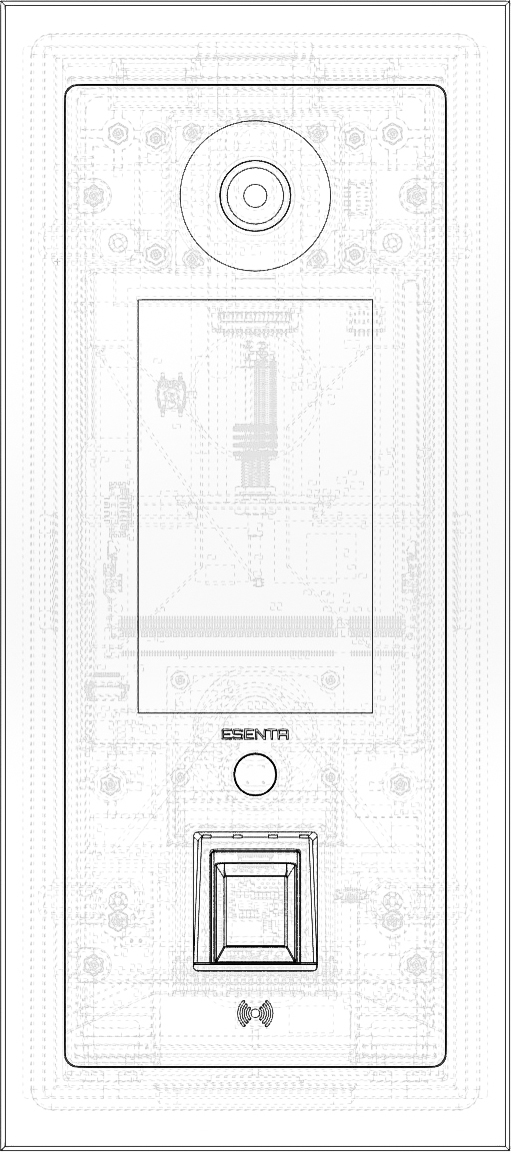
ESENTA SIAS construction drawing

Technical Data

Authentication

Fingerprint reader (capacitive measuring method), more than 500 different fingers can be registered, access code entry via touch display.

Sensors

Radar sensor for detecting people in the vicinity. Brightness sensor to regulate the display backlight, acceleration sensor for sabotage detection.

Connectivity

Ethernet 10/100BASE-T, 2-wire via Si-2WIP.

Outputs

6x potential-free switching contacts (3x inside and 3x outside, freely adjustable).

Configuration

Via web interface or smartphone app.

Power Supply

Input voltage: 12V to 48V DC, compatible with passive PoE. Power consumption: 4–6 watts.

How can ESENTA SIAS contribute to the security of my building?

To further secure your building, ESENTA SIAS can keep an eye on your front door at all times. If you wish, you can receive instant push notifications whenever something happens.

ESENTA SIAS detects movement at your doorstep and can instantly send notifications to your smartphone, tablet or email, and store and make recordings available to you personally. A live stream of the camera can be accessed via the app, and a history of registered events can be viewed.

What advantages does ESENTA SIAS offer me?

Multi-family building

Easy to connect

ESENTA SIAS offers you many options for connecting to your building network. The connection can either be established via a conventional network cable or with the help of a so-called 2-wire module using existing cabling. With a 2-wire module it is possible to install both the network and the power supply via two existing wires (e.g. bell wire).

Versatile devices

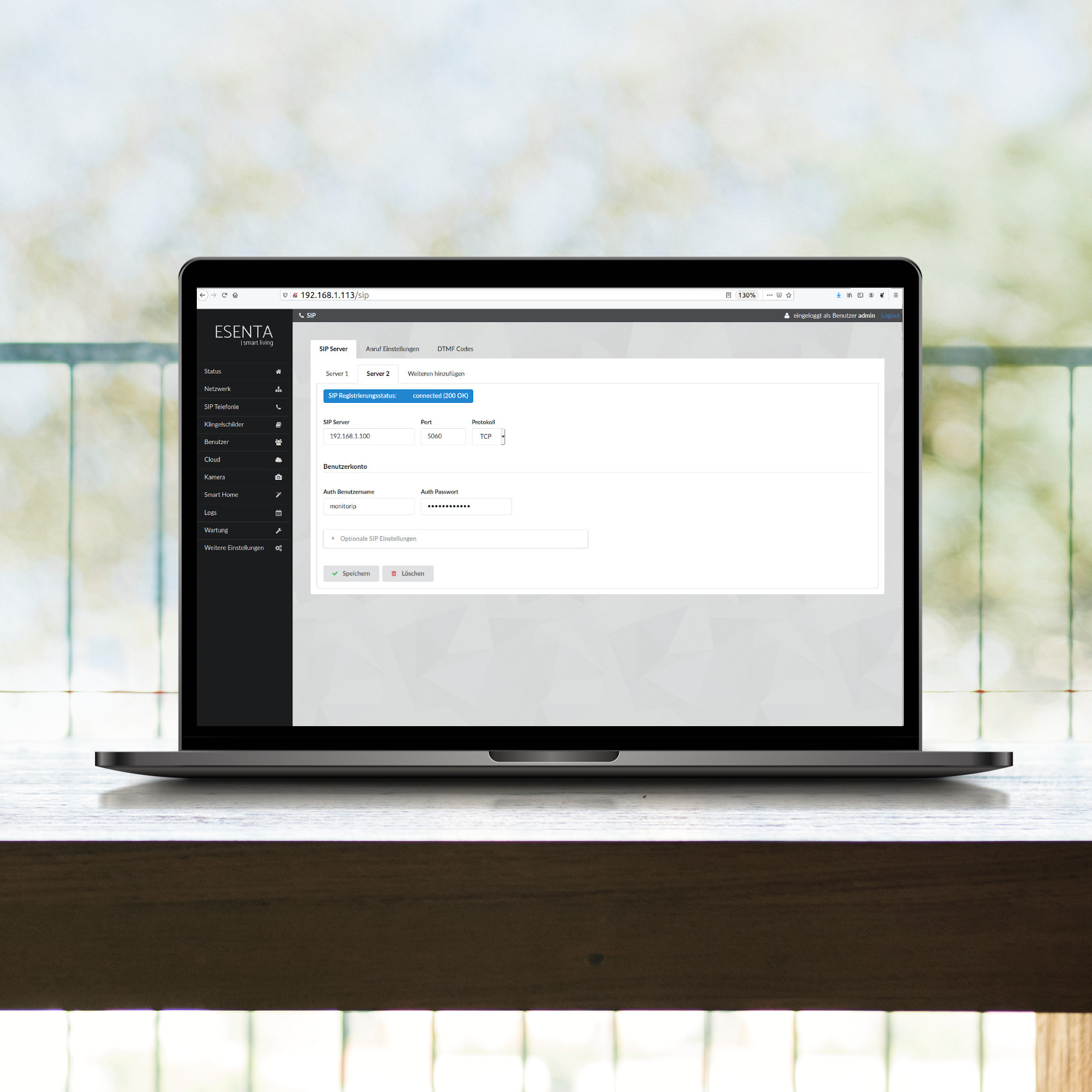
You can use a variety of devices, including your existing Android or iOS smartphone, SIP phone, and tablet. If you operate your own SIP PBX, ESENTA SIAS can be integrated with little effort. The connection to multiple SIP servers at the same time is also supported.

Cloud-use optional

The cloud function can be switched off – ESENTA SIAS can be used together with your own SIP server (e.g. a FRITZ!Box) even without an active internet connection.

Operation With or Without a SIP Server

Integrate the IP door intercom into your project exactly the way you need it: with your own SIP server, an external SIP server, or just the ESENTA cloud service with app.

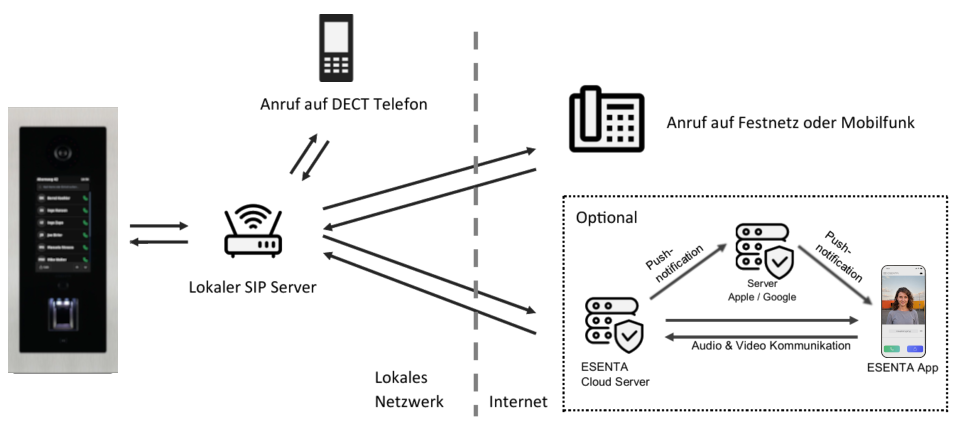
Operation with a local SIP server

Connection to a local SIP server, such as a FRITZ!Box or PBX system: calls reach either a DECT phone with video or a landline/mobile phone without video – optionally supplemented by the ESENTA Cloud with app notifications.

Diagram: operation with a local SIP server (FRITZ!Box or PBX system)

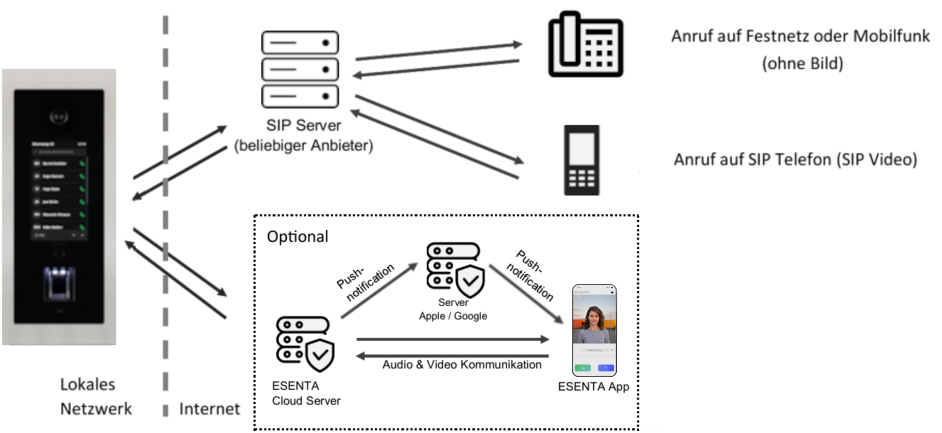
Operation with an external SIP server

Connection to a SIP server from any provider: calls reach a landline, mobile phone, or a SIP video phone – likewise optionally supplemented by the ESENTA Cloud with app notifications.

Diagram: operation with an external SIP server (any provider)

Smart Home Integration

Take advantage of the Internet of Things and make your everyday life easier. Integrate your door intercom into your existing building automation with ease. Thanks to the manufacturer-independent interfaces (MQTT, HTTP-API), there are numerous possibilities for controlling processes in your Smart Home:

  • Control of gates and doors
  • Activation of outdoor lighting
  • Control of alarm systems via the ESENTA HUB (secured)
  • Home automation via WiFi relay
  • Integration of IP cameras via RTSP
ESENTA web interface on a laptop
Deutsch English Français Italiano Español